StarFive VisionFive 2 (riscv64)
riscv64 is not an official Kairos target yet (see the riscv64 epic
and the open invitation). This page records what was validated on real
hardware in kairos#4635: a VisionFive 2 v1.3B (8 GB) with an NVMe drive,
running the community image quay.io/mauromorales/kairos-riscv64:0.1.3-img and a locally built Kairos v4.4.0 riscv64 image.
k3s comes from the CARV-ICS-FORTH riscv64 fork, as k3s has no official riscv64 release.
Prerequisites
- A StarFive VisionFive 2 (tested: v1.3B) and an M.2 NVMe drive, a USB stick or a microSD card. microSD cards larger than 128 GB don't boot.
- A USB-C power supply. USB PD at 9 or 12 V is recommended (an 18 W 5/9/12 V charger works).
- Active cooling: without a fan, the JH7110 reaches about 80 °C at 1.5 GHz and the kernel hard-locks (
watchdog: Watchdog detected hard LOCKUP on cpu 0). - A 3.3 V USB-to-UART adapter for the serial console:
| Board (40-pin header) | Adapter |
|---|---|
| pin 6, GND | GND |
| pin 8, UART0 TX | RX |
| pin 10, UART0 RX | TX |
U-Boot and GRUB use 115200 8N1. The Kairos kernel console runs at 9600 baud: the GRUB config sets console=ttyS0 with no
speed. Switch your terminal after Booting 'Kairos'.
Boot DIP switch
| RGPIO_1 | RGPIO_0 | Boot source |
|---|---|---|
| 0 | 0 | SPI flash (default) |
| 0 | 1 | microSD |
| 1 | 0 | eMMC |
| 1 | 1 | UART |
Update the SPI firmware first
The factory U-Boot (vendor 2021.10) is not EBBR compatible, and the Kairos kernel handoff traps in OpenSBI. Flash a current
U-Boot and OpenSBI to the SPI flash, for example the ones shipped in Ubuntu 24.04's jh7110 image
(Canonical guide):
- Write
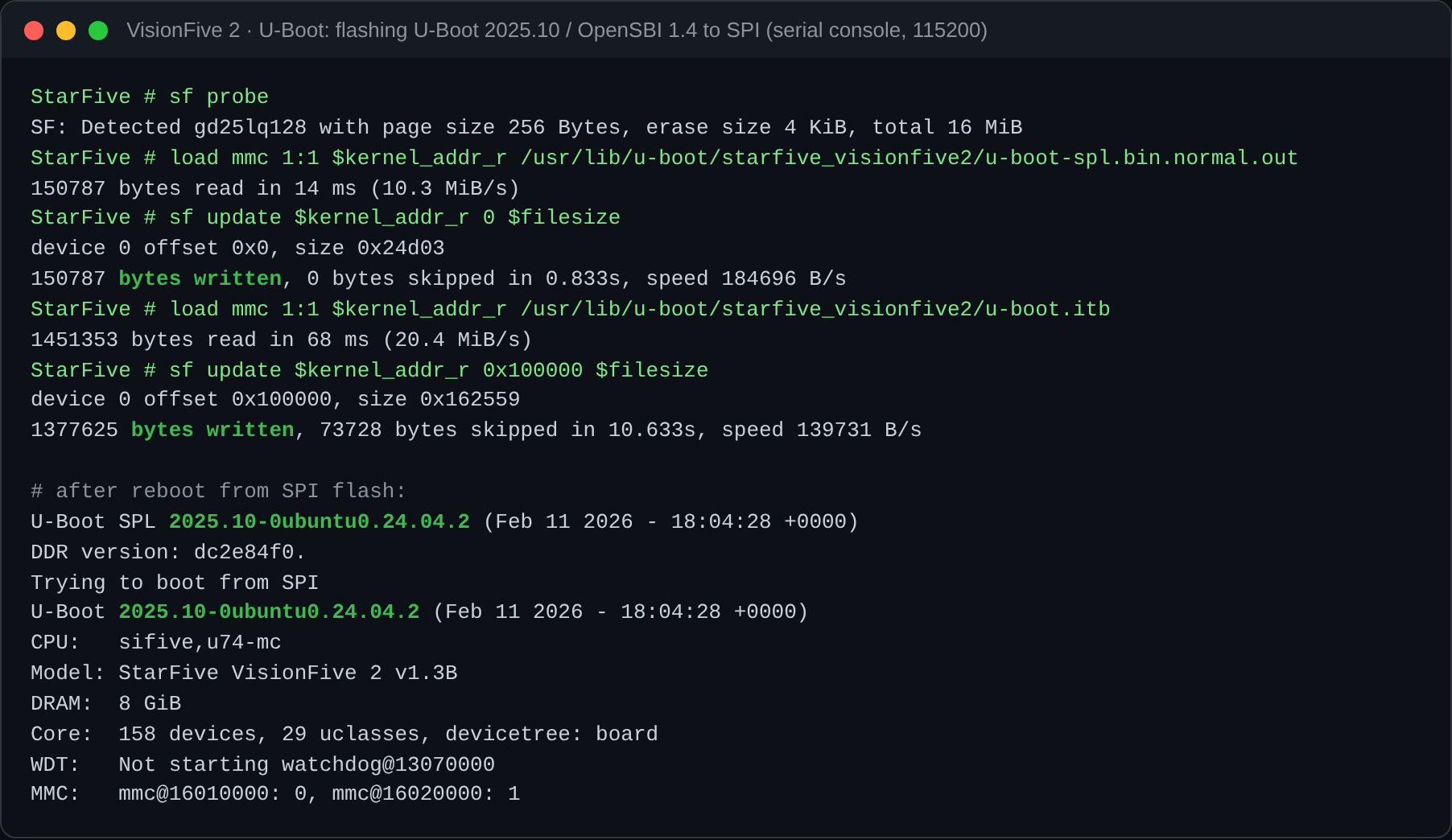
ubuntu-24.04.5-preinstalled-server-riscv64+jh7110.img.xzto a microSD card. Set the DIP switch to microSD, power on, and press a key to stop autoboot. - At the U-Boot prompt:
sf probeload mmc 1:1 $kernel_addr_r /usr/lib/u-boot/starfive_visionfive2/u-boot-spl.bin.normal.outsf update $kernel_addr_r 0 $filesizeload mmc 1:1 $kernel_addr_r /usr/lib/u-boot/starfive_visionfive2/u-boot.itbsf update $kernel_addr_r 0x100000 $filesize
- Power off, set the DIP switch back to SPI flash, power on, then run
env default -f -aandenv saveat the prompt.
The banner should now read U-Boot 2025.10…, with OpenSBI 1.4 and EFI v2.11 by Das U-Boot. USB and NVMe boot become available.
Install
Option A: raw image on the NVMe
From any Linux running on the board (for example the Ubuntu microSD above):
container=$(docker create --platform linux/riscv64 quay.io/mauromorales/kairos-riscv64:0.1.3-img noop)
docker cp "$container:/output/." . && docker rm "$container"
dd if=kairos-*.raw of=/dev/nvme0n1 bs=4M oflag=direct
sgdisk -e /dev/nvme0n1          # move the backup GPT header to the end of the disk
# optional: add your cloud-config to the COS_OEM partition
mount /dev/nvme0n1p2 /mnt && cp cloud-config.yaml /mnt/91_custom.yaml && umount /mnt
The first boot runs recovery and resets the disk layout (COS_STATE, COS_PERSISTENT), then reboots into the active system.
If U-Boot doesn't pick the NVMe by itself, boot it once from the prompt:
nvme scan
load nvme 0:1 $kernel_addr_r EFI/BOOT/BOOTRISCV64.EFI
bootefi $kernel_addr_r
Option B: live ISO from a USB stick
Write the riscv64 ISO to a USB stick with dd. With the updated U-Boot, boot it with
usb start; load usb 0:2 $kernel_addr_r EFI/BOOT/BOOTRISCV64.EFI; bootefi $kernel_addr_r. Partition 2 is EFI_LIVE.
The live system logs in as root on the serial console. The interactive installer runs on tty1 (HDMI), and the web installer
listens on port 8080. On a headless board, install from the serial or SSH shell:
kairos-agent manual-install --device /dev/nvme0n1 cloud-config.yaml
Unplug the USB stick afterwards: with the stick present, U-Boot boots USB before NVMe.
Example cloud-config with k3s
#cloud-config
users:
  - name: kairos
    groups: [admin]
    ssh_authorized_keys: ["ssh-ed25519 AAAA..."]
k3s:
  enabled: true
  args:
    - --disable=traefik
    # containerd's overlayfs snapshotter can't stack on Kairos' overlay root filesystem
    - --snapshotter=native
Validated

| Feature | Result |
|---|---|
| Boot, auto-reset install, login | ✅ |
| k3s server Ready (v1.36.3, CARV-ICS-FORTH fork) | ✅ |
A/B upgrade (kairos-agent upgrade --source oci:…) and rollback (fallback entry) | ✅ |
Recovery upgrade (--recovery) and state reset | ✅ |
| Upgrade from 0.1.3 to a Kairos v4.4.0 riscv64 image | ✅ |
Live ISO from USB + manual-install to NVMe | ✅ |
Building a newer riscv64 image
No riscv64 Kairos image is published yet, and the quay.io/kairos/kairos-init image has no riscv64 variant. The Kairos
releases do ship riscv64 binaries (kairos-init-<version>-linux-riscv64.tar.gz, provider-kairos-<version>-linux-riscv64.tar.gz).
Starting from ubuntu:24.04, copy the kairos-init binary into the build (instead of FROM kairos-init), run
kairos-init -s install and -s init, then add the k3s fork and provider-kairos as the agent provider
(/system/providers/agent-provider-kairos). Under qemu-user emulation on x86_64, the build takes about 50 minutes.
Known issues
- The kernel console defaults to 9600 baud (
console=ttyS0without a speed in the GRUB config). - The live installer UI only shows on
tty1. - After a hard lockup, the NVMe can stay unavailable (
CSTS=0x0) across warm reboots. A cold power cycle brings it back. - If a node's IP changes, k3s fails with
failed to find interface with specified node ipuntil the stale Node object is deleted.